
Knowledge-
Activated
Design.
From static CAD to models that think.
Knowledge-Activated Design (KAD) is OCMEE's parametric methodology. It puts engineering rules, checks and reactions inside the CAD model, so the model evaluates itself and rebuilds every time an input changes. The CAD model does the work for you, not the other way around.
Knowledge+Embedded+Parametric+Intelligence
KEPI: the four layers in every KAD model
KAD in 60 seconds
See Knowledge-Activated Design work.
What KAD changes
Static CAD stores geometry. KAD stores the engineering.
Knowledge-based engineering has existed for 40 years, but the rules still live outside the part. KAD moves them inside, where they fire on every update.
STATIC CAD + CLASSIC KBE
Rules beside the model
- Rules stored in separate documents
- Engineers apply them by hand
- Checks happen in review meetings
- Every input change restarts the work
KNOWLEDGE-ACTIVATED DESIGN
Rules inside the model
- Rules embedded in the part
- Changes cascade automatically
- Geometry, parameters and checks linked
- A broken rule turns red in the model
Activated, not advanced. The verb matters.
How KAD works
Three node types. Data flows one way.
FEINPUTS
Feeder
What the engineer supplies each time: styling A-surface, body reference, ground line, package data, regulatory inputs.
What can we supply each time?
VABRAIN
Variable architecture
Where the IP, parameters, rules, checks and reactions live. Geometry is built and validated here.
What rules and IP do we embed?
COOUTPUTS
Components
Final geometry consumed downstream: brackets, plastic parts, foams, fixings, keep-outs, packaging envelopes.
What does the customer need out?
ChecksBOOLEAN CONDITION
Test the geometry and warn when false. They read only.
distance(`PDC Bracket BEZEL`, `Vision Cone`) > 0mmRulesIF / ELSE LOGIC
Read check results and assign values, colours and visibility on every update.
If `What PDC Inputs?` == "ADAS" {
`SENSOR CENTER P4U`
= `External Ref\REF_SENSOR P4U`
}ReactionsEVENT TRIGGERED
Fire on a value change, synchronously, with no manual update and instant visual feedback.
Source: ValueChange
If `SPACING SNSRS Y` > 200mm {
`INSET` = "VERY CRITICAL"
`BALLOON`.Color = "Red"
}
Check sees. Rule decides. Reaction speaks.
Where it scales
Stop rebuilding knowledge that already exists.
Every KAD project sits on a four-tier ladder. You climb it by combining and linking models.
TIER01
Template detail
Single repeatable feature
Examples: rib, boss, clip, fixing point
TIER02
Template model
Cross-part rules, not tied to one program
Examples: bracket, sensor housing, plate
TIER03
Generic network
Linked template models at system level
Examples: body-in-white, armrest trim, PDC network
TIER04
Generic vehicle
Cross-domain network of networks
Goal: full vehicle architecture
One method, two products. A safety-critical exterior system (parking sensors) and a comfort-critical interior system (centre console armrest) share the same FE-VA-CO topology and the same three control objects.
See the first applicationBuilt on CATIA V5 Knowledgeware and the 3DEXPERIENCE platform: design tables, PowerCopies, publications, checks, rules and reactions.
First application · Park distance control
KAD PDC: every sensor move used to restart a five-team loop.
ADAS picks a position. Design wants a clean bumper surface. Packaging checks clearance against three load cases. Body Engineering redraws the bracket. Program Management tracks timing and cost, and signs off. When styling moves the fascia, the whole chain runs again.
ADAS→
Design→
Packaging→
Body Engineering→
Program Management↺
80–100 hper change cycle
Every time one sensor position moves.
~10×per program
Styling iterates and the loop repeats. Up to 40 times on some vehicles.
~800 hrework per program
Engineering time spent re-doing the same work.
And it is growing
More sensors. More loops. More cost per car.
Autonomous parking adds side sensors. Each new sensor multiplies the bracket, bezel and clearance work, and every painted bezel adds cost to every car built.
8 → 12sensors per vehicle
Standard PDC vs autonomous parking.
+$15per car
12 painted bezels on a premium vehicle.
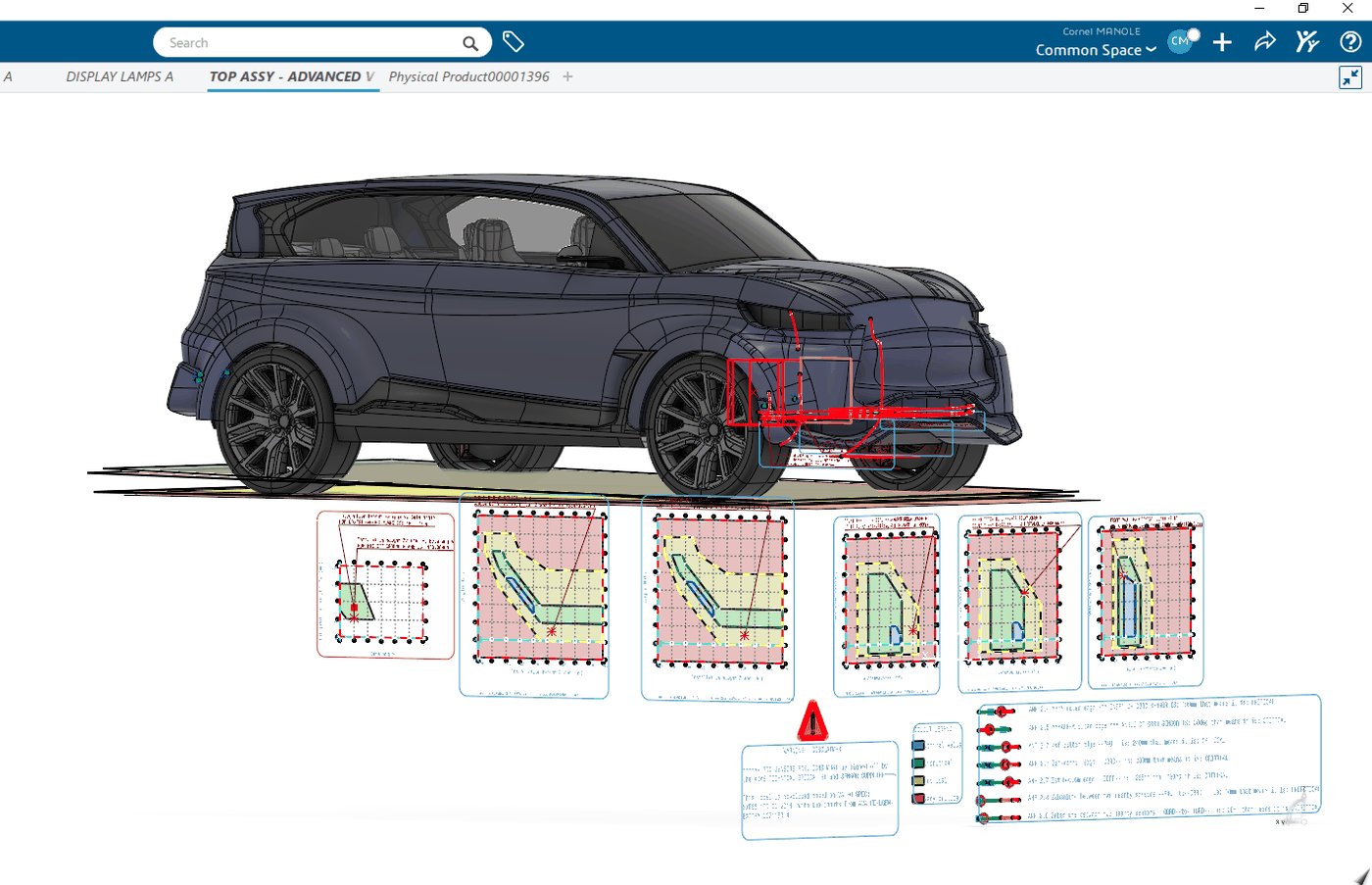
KAD PDC in practice
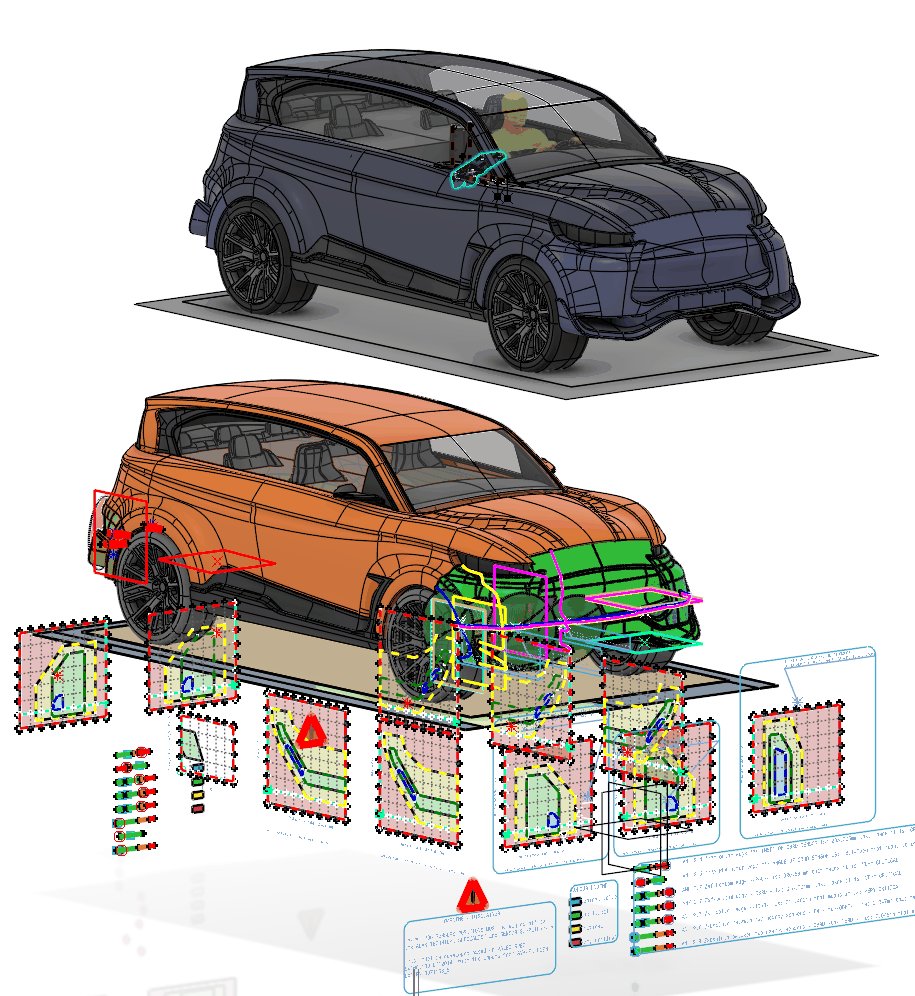
The PDC network, built with KAD.
- 1Change one input
Move a sensor or swap the bumper A-surface in the Feeder model.
- 2The model re-checks itself
Clearance, ground-plane and spacing checks fire on every rebuild. Red means a rule broke.
- 3Brackets and cut-outs rebuild
Every team gets updated geometry. No meeting in between.
FEFeeder→
VAVariable architecture→
COComponents
Proven in production
Four production programs. One fifth of the hours.
19 h
per change cycle, down from 80 to 100 hours.
4 + 4production programs
At a major automaker, plus four more run by a second engineer.
~2 hlater updates
Geometry regenerates in minutes.
2×faster brackets
12-bracket set: about 40 h against about 80 h fully manual.
Author-recorded figures, reported in IEEE Access 2026. Mean of 19 h across programs (range 15 to 25 h).
In their words
Engineers who saw it work.
“I was Cornel's Lead Engineer at a major UK OEM and later recommended him to another. His parametric PDC system encoded design intent in the models themselves, so a styling change propagated instead of restarting the work. On bumpers alone it saved around 40 hours of modelling per iteration. It is an original contribution, not a refinement of an existing method.”
“I evaluate body and exterior engineering at OEM level every day. Cornel's parametric PDC system replaced a manual loop of up to forty iterations across ADAS, Design, Packaging and Body Engineering with one connected model, now formalized as Knowledge-Activated Design. In my view it is an original contribution to the field, backed by documented results rather than claims.”
Built and published
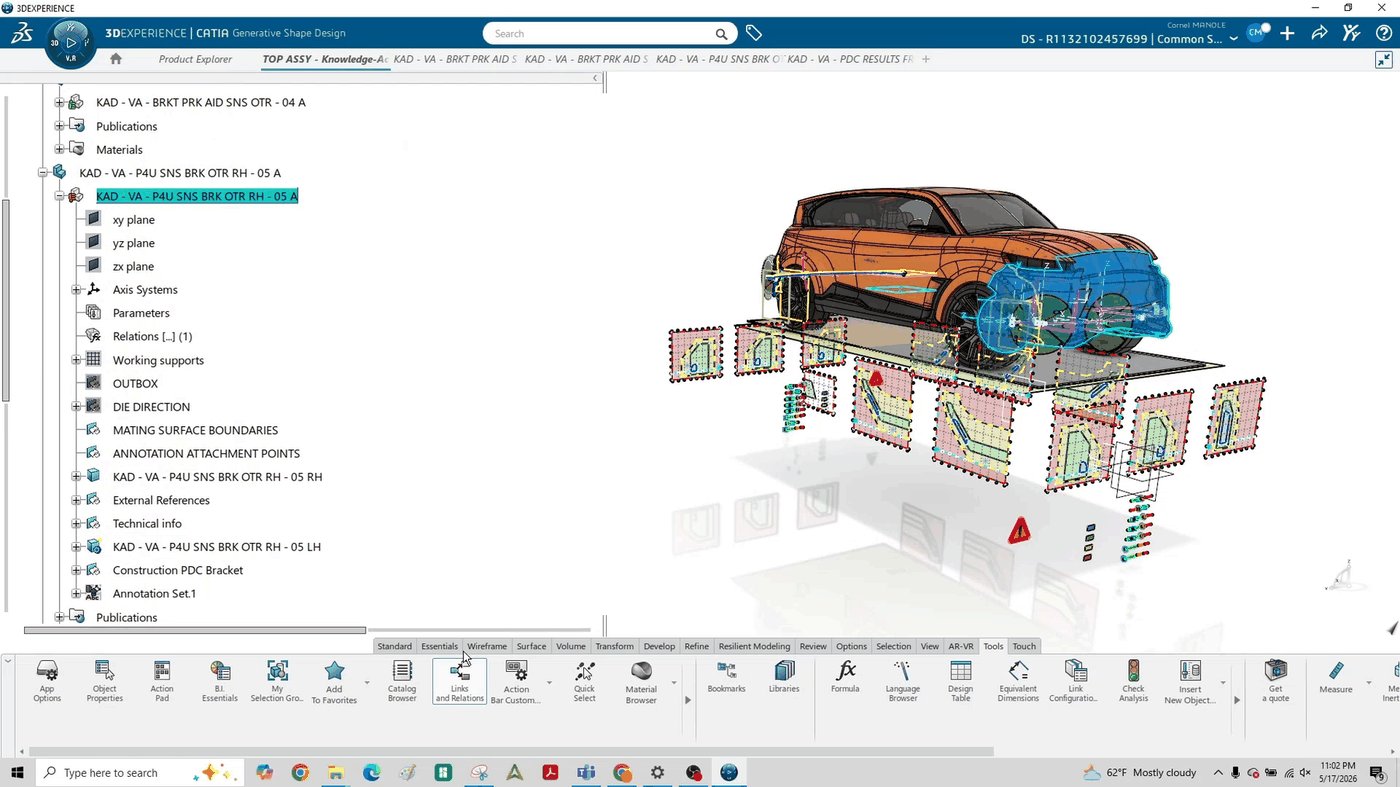
The product runs today in 3DEXPERIENCE.
IEEE Access, 2026
Peer-reviewed journal paper on KAD for PDC sensor integration. DOI 10.1109/ACCESS.2026.3735368
CUSA 2026, Reno
Two sessions accepted by Dassault Systèmes at the CATIA user conference.
3DX user groups
SF Bay and SoCal 3DEXPERIENCE user groups, 2026.
Fast to deploy
About 20 hours to set up a new vehicle program.
Who it is for
Teams that package sensors into bumpers.
EV makers
Small teams, heavy ADAS content, fast programs. Cut the packaging loop without adding headcount.
Engineering service firms
Deliver sensor packaging studies in a fraction of the hours and win more programs.
Tier-1 bumper suppliers
Own the fascia and the brackets. Answer every OEM position change the same day.
Paid pilot: 8 weeks on one of your vehicle programs, with a before and after hours report your team signs off.
Request a pilotRoadmap
Same problem, more sensors.
NOWUltrasonic PDC
Positions, brackets and bumper cut-outs. On nearly every new US vehicle since 2018.
NEXTRadar
Fascia zones, mounting angle and paint constraints.
THENCamera
Field of view and obstruction checks.
LATERLidar
A full ADAS sensor packaging suite.
KAD questions
What is Knowledge-Activated Design?
Knowledge-Activated Design (KAD) is an advanced parametric modelling method for CATIA V5 and 3DEXPERIENCE, created by Cornel Manole at OCMEE Design. It combines 3D modelling with scripting in EKL (Engineering Knowledge Language), embedding engineering rules, checks and reactions inside the CAD model. When an input changes, the model re-checks itself and rebuilds the affected geometry. AI drafts the EKL rules and scripts; engineers validate every one.
| Static parametric CAD | Classic KBE | Knowledge-Activated Design | |
|---|---|---|---|
| Where the rules live | In documents and engineers' heads | In separate documents or tools, beside the model | Inside the part, embedded in the model |
| Who applies the rules | Engineers, by hand | Engineers, by hand | The model, on every update |
| When checks happen | In review meetings | In review meetings | On every rebuild; a broken rule turns red |
| An input change | The work restarts | The work restarts | Changes cascade to the affected geometry |
| What it stores | Geometry | Geometry plus external rules | Geometry, parameters, checks, rules and reactions, linked |
| PDC change cycle | 80 to 100 h | 80 to 100 h | 19 h mean (range 15 to 25 h) |
What is Knowledge-Activated Design (KAD)?
KAD is a parametric CAD methodology from OCMEE Design. It puts engineering rules, checks and reactions inside the CAD model instead of in separate documents. When an engineer changes an input, such as a sensor position or a bumper surface, the model evaluates itself and rebuilds the affected parts automatically.
How is KAD different from knowledge-based engineering (KBE)?
Knowledge-based engineering has existed for about 40 years, but its rules usually live outside the part and engineers apply them by hand. KAD moves the rules inside the model, where they fire on every update. A broken rule turns red in the model immediately, instead of surfacing later in a review meeting.
What does KEPI mean in KAD?
KEPI stands for Knowledge, Embedded, Parametric, Intelligence: the four layers in every KAD model. Engineering knowledge is embedded in a parametric model, and the model applies it intelligently through checks, rules and reactions. Every KAD model follows a one-way flow: Feeder inputs, Variable architecture, then Components.
Which CAD software does KAD run on?
KAD is built on CATIA V5 Knowledgeware and the Dassault Systèmes 3DEXPERIENCE platform. It uses native tools: design tables, PowerCopies, publications, checks, rules and reactions. The KAD PDC product runs today in 3DEXPERIENCE as a clean-room rebuild with 14 components and one source of truth.
What results has KAD shown in production?
On park distance control (PDC) sensor packaging, KAD cut each change cycle from 80 to 100 hours to a mean of 19 hours, across four production programs at a major automaker plus four more run by a second engineer. Later updates take about 2 hours. The results are reported in IEEE Access, 2026.
What is KAD PDC and who is it for?
KAD PDC is the first KAD application: parking sensor positions, brackets and bumper cut-outs that rebuild when a sensor or fascia changes. It is for EV makers, engineering service firms and Tier-1 bumper suppliers. A new vehicle program takes about 20 hours to set up, and OCMEE offers an 8-week paid pilot.
What is EKL and how does KAD use it?
EKL (Engineering Knowledge Language) is the scripting language built into CATIA and 3DEXPERIENCE for writing rules, checks, reactions and actions. KAD uses EKL to turn engineering knowledge into code that lives inside the model, so a clearance limit or a sensor spacing rule is checked on every rebuild instead of by hand.
How does KAD make CATIA engineers more productive?
KAD replaces repeated manual rework with models that update themselves. On parking sensor packaging, a change cycle dropped from 80 to 100 hours to a mean of 19 hours, later updates take about 2 hours, and a 12-bracket set takes about 40 hours instead of 80. Setting up a new vehicle program takes about 20 hours.
Does KAD use AI to automate CAD?
Yes. OCMEE uses AI to draft EKL rules, checks and scripts from engineering requirements. Engineers review and validate every rule before it goes into a model, so the automation stays traceable. AI speeds up writing the knowledge; the CAD model then applies it on every rebuild.
Source: C. S. Manole, "Knowledge-Activated Design: A Parametric Methodology for Automotive Park Distance Control Sensor Integration," IEEE Access, 2026. doi:10.1109/ACCESS.2026.3735368. Last updated October 2026.
Team
Built by engineers who did the job.
Cornel ManoleCO-FOUNDER · CTO
15 years of body engineering across 6 OEMs. CATIA Champion. Originator of KAD. Inventor on 2 patent filings.
Oana ManoleCO-FOUNDER · CEO
11+ years in automotive and aerospace electrical and mechanical design, including wiring harness design for premium UK automotive programs and Boeing and Airbus cabin programs.
Contact
Run KAD PDC on your next program.
Tell us your vehicle program and CAD platform. We reply within two business days.
OCMEE Design LLC · Irvine, California · www.ocmeed.com
KAD PILOT REQUEST
Run KAD on one of your programs.
Tell us who you are. We drafted the message for you; edit anything before sending.
Loading the form…
Goes straight to the OCMEE team at office@ocmeed.com. We reply within two business days.